FM mode — YM2612
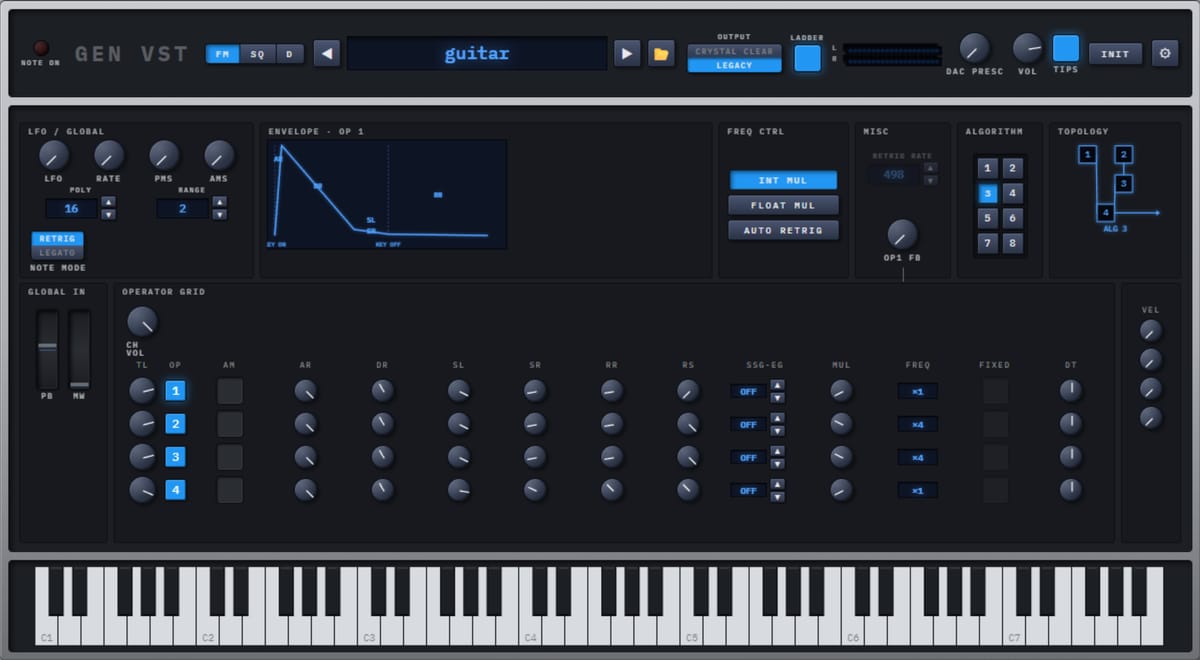
Six-operator FM with 16-voice polyphony, a hardware-style operator grid and all four FREQ CTRL modes (INT, FLOAT, AUTO RETRIG).
A Sega Genesis inspired VST3/AU/CLAP audio plugin emulating legendary audio FM synth and PSG chips (YM2612/SN76489).
3D & Audio · Windows · macOS · Linux
Installers are not code-signed yet
What's inside
Six-operator FM with 16-voice polyphony, a hardware-style operator grid and all four FREQ CTRL modes (INT, FLOAT, AUTO RETRIG).
Three tone channels plus a noise channel, each with its own ADSR, detune and pan.
An audio FX chain for your own tracks: sample-rate decimation, 8-bit quantization, mono and dry/wet. Not a sampler.
About 40 original FM patches, 47 community FM patches from Furnace’s tfilib, and 12 hand-tuned PSG presets in a tagged, folder-based browser.
.tfi, .vgi, .dmp, .y12, .opm, .vgm and .psg patches, with automatic mode switching. Drag folders onto the window.
201 unit tests and pluginval --strictness-level 8 on Windows VST3 before release.
Getting started
Windows: .exe installer. macOS: .pkg (Apple silicon or Intel). Linux: .tar.gz for VST3 + CLAP or an AppImage for standalone.
Windows: SmartScreen → More info → Run anyway. macOS: System Settings → Privacy & Security → Open Anyway. Linux: install libwebkit2gtk-4.1-0 if it is missing.
Rescan plugins in your DAW, drop Gen VST on a track, and start from a factory patch — or load a bank you already own.
Modes
| Mode | Chip and character |
|---|---|
| FM | YM2612 via ymfm. Six-operator FM, 16-voice polyphony, bass, bells, brass, drums and leads. |
| SQ | SN76489 via libvgm. Three square-wave tone channels plus noise — the bright, simple voice of the console. |
| D | Pure DSP. Decimation, 8-bit quantization and mono for your own audio. An effect, not an instrument. |
Under the hood
Gen VST pairs authoritative chip emulation with a WebView UI, so the interface can be as detailed as the DSP without slowing the audio thread.
The audio path is a single C++20 / JUCE 8 plugin: ymfm for the YM2612, libvgm’s SN76489 core, and a pure-DSP chain for D mode and the shared output bus. The UI is HTML/CSS/JS bundled by Vite and rendered through JUCE’s WebView component, with a two-way bridge to the parameter tree.
Gen VST FAQ
VST3 and CLAP on Windows, macOS and Linux; AU on macOS; and a standalone app on all three platforms.
Yes. It is released under GPL-3.0, and the source is public on GitHub.
No. D mode is an audio effect: it runs the track’s audio through Genesis-style sample-rate decimation, 8-bit quantization, mono summing and a dry/wet control.
No. The YM2612 and SN76489 emulation is inside the plugin, and it runs as VST3, AU, CLAP or standalone on your computer.
No game-derived patches are distributed. The factory banks are original and community patches with generic names. You can import your own banks from .tfi, .dmp, .vgm and similar files in the plugin browser.
The installers are not code-signed yet. Windows may show SmartScreen and macOS Gatekeeper will ask once; the README documents the exact steps, including the System Settings path on macOS Tahoe.
Keep browsing